L’Internet des Objets
30.1 Introduction lora st
La carte contient les élémensts suivants :
-
• Optimized IoT tracker solution over LoRaWANTM network with simultaneous multi-constellation GNSS positioning and geofencing support
-
• Battery operated solution with smart power management architecture
-
• First IoT ST reference embedding a USB Type-C connector and a port controller
-
• Environmental and motion sensors
La documentation est disponible à https://www.st.com/resource/en/user_manual/dm00595064.pdf.
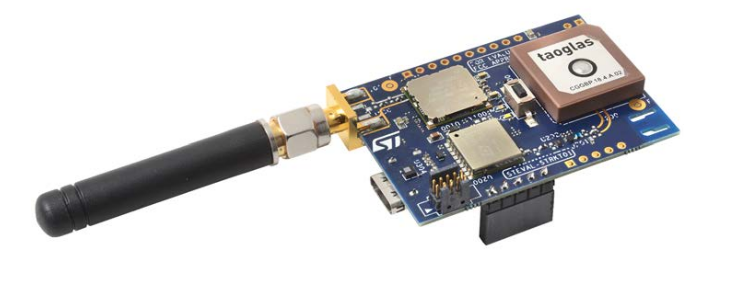
Elle est livré avec un système sur la carte. Les points importants sont :
-
• Connecter l’antenne AVANT la mise sous tension ;
-
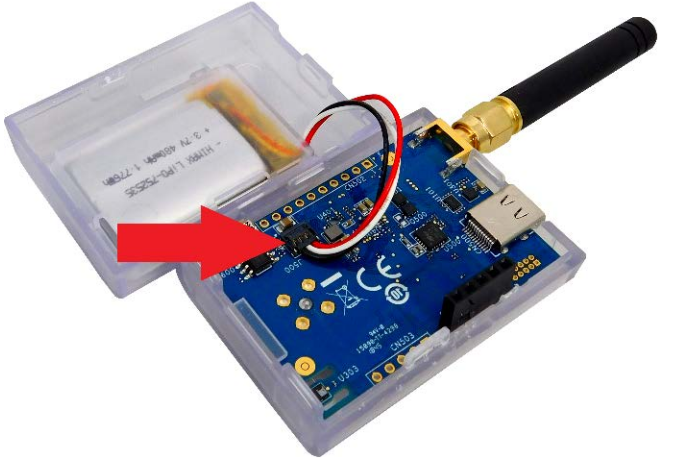
• Brancher la batterie correctement.
La batterie se branche comme dans la figure 30.2.
Après avoir branché le câble USB, il faut connecter un terminal sur celui-ci ;
minicom -D /dev/ttyACM0 -b 115200
L’identification de la carte se fait en récupérant son DevEUI.
La carte affiche alors en boucle des informations :
>> sleep_timer_event
State machine change: State_Run
Got sensor data: T: 26.16 H: 66.34 P: 988.36
Accelerometer: X: -196 Y: 85 Z: -967
Got coordinates: 43.384594 N, 5.706995 E, ALT:329.829987
01/06/19 19:12:18 - 0 sats - Fix 0
Got sensor data: T: 26.14 H: 66.35 P: 988.42
Accelerometer: X: -196 Y: 88 Z: -962
Got coordinates: 43.384594 N, 5.706995 E, ALT:329.829987
01/06/19 19:12:28 - 0 sats - Fix 0
>> read_timer_event
State machine change: State_Read
Enable and read sensors
Got sensor data: T: 26.18 H: 66.23 P: 988.38
Accelerometer: X: -195 Y: 74 Z: -962
Enable and read GNSS
Got coordinates: 43.384594 N, 5.706995 E, ALT:329.829987
01/06/19 19:12:37 - 0 sats - Fix 0
Send data...
SEND REQUEST
SENDING:
  Battery voltage: 4.06V
  Battery charge: 86%
  T: 26.18 H: 66.23 P: 988.38
  Accelerometer: X: -195 Y: 74 Z: -962
  LAT:43.3846 LON:5.7070 ALT:329.83
  epoch_value:754
PHY txDone
PHY rxTimeOut
PHY rxTimeOut
State machine change: State_CheckAck